Your Guide to Parking When You Reserve Online

Reserve Online
Plan your trip and make your reservation from the options available.

Head to Parking Location
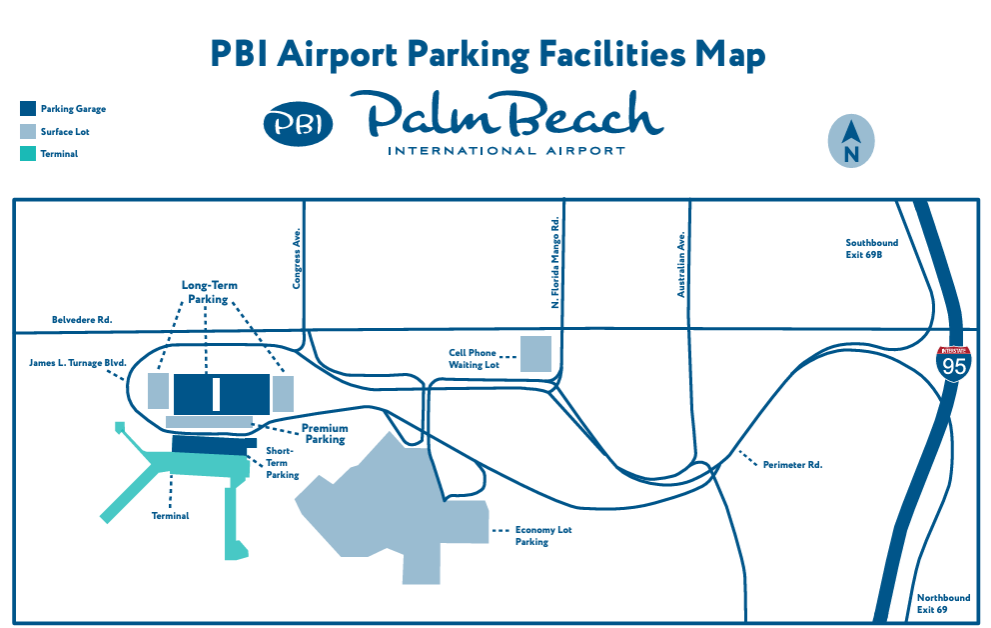
Use the PBI Parking map (shown below) to navigate to your parking location.

Enter the Gate
At the entry gate, scan the QR code from your confirmation email. Do NOT pull a ticket to enter.

Park & Head to the Terminal
Find a parking space and walk to the terminal. For the Economy Lot, you can take a short walk or take the complimentary Economy Shuttle to the terminal.

Return to Your Car & Exit
After your trip, return to your vehicle and proceed to the exit plaza. At the gate, scan your QR code and exit. Thank you for choosing PBI.